IAC logo The world of non-commercial film and
A-V making
Events Diary Search
The Film and Video Institute find us on facebook Join us on Facebook


Build a Club Website 2 - Sign Up with Weebly

Let's Go!

Go to your second web browser window. (If you only have one open at the moment go to the File menu and choose to open a new window.) Type in to the address bar at the top www.weebly.com  
(That means you keep this page ready in a window, while the Weebly opens in the other.)
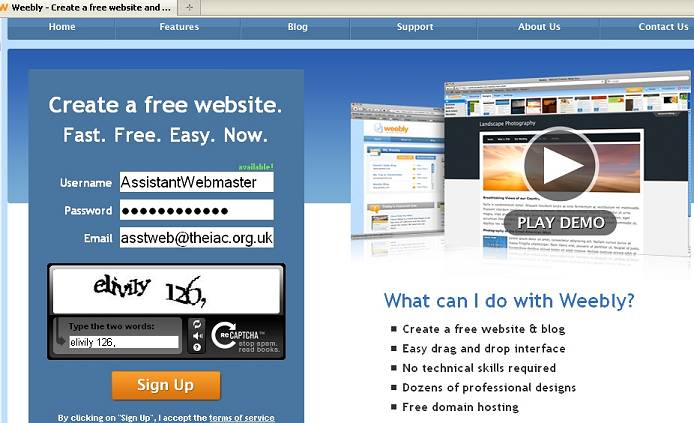
Weebly looks like this:

Screenshot of the Weebly sign-up page.

1.

Check their "terms of service" if you wish. It is the usual legalistic gobbledygook. The essential elements are that you must be over 13 to sign up, must not put anything illegal on your website, must respect copyrights and that if you cancel or the company folds then all your work is gone forever. Don't worry about that part. I have a cunning plan ... more later.

Type in a Username,  password and a valid email address.

I strongly suggest you tell the username and password to one or two other club members ... so that if you go to Australia for six months or just need help with updates - someone else can look after the club website.

2.

When you have typed in the username, an extra box appears. This is known as a CAPTCHA system and is to make sure that you are a human being not a computer program. Type the letters, numbers and punctuation and click "Sign Up".

If at first you don't succeed: try, try, try again ...

NO!   Try once more - a different set of letters will be shown. If that does not work, click the little picture of a loudspeaker and listen to a distorted voice reading out letters and numbers and type them in. (Watch out for "zero" which can sound very odd.) CAPTCHA systems are a nuisance but they help keep down spam.

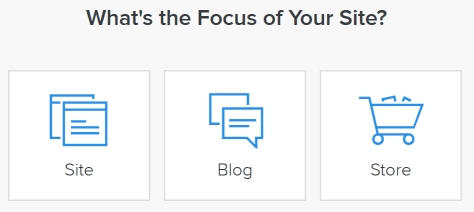
Screen capture of Weeblys request for a website title.

Then you need a name for the website.

This can be changed later, but you might as well give it the name of your club.

Here we have invented a club.

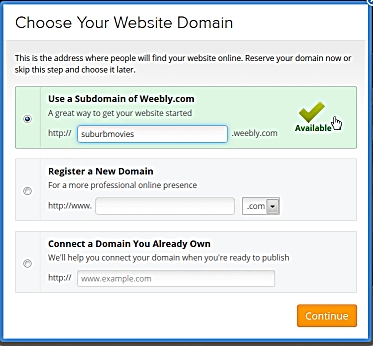
Choose A Website Address

Be careful. Weebly usually fills in option B, which costs money ... so for now choose Option A - as shown on the right ...

Screen shot of Weebly domain name dialog box.Screen shot of Weebly domain name dialog box.

(Once the website is up and running, you may come back to this choice and pick a different option.)

The name you type here is what people will have to type into their web browsers to see the new club website, so keep it as short as you can. It is best to write it all in lower case letters, because some older web systems get fussy about capitals.

If no one else has already chosen that name, the word "available" appears in green beside it.

If it is not available, you will have to invent a slightly different name. Here we simply inserted a hyphen. We could have tried "midlandsmovies" or "midlandsmoviesclub" for example. Do not use an underline, "midlands_movies",  because that confuses people.

When all is well, click "Continue" and we are off!

Click here for part 3 - making your first web page.


Jump to: Getting started | Weebly sign up | your first page | additional pages
pictures & words | Coming Soon | forms, emails, maps & videos

Audience silhouette. Audience silhouette.
Page updated on 17 January 2011       find us on facebook Join us on Facebook       UNICA information UNICA member
Company Limited by Guarantee No. 00269085. Registered Charity No. 260467. Authors' views are not necessarily those of the Institute of Amateur Cinematographers. Website hosted by Merula. JavaScripts by JavaScript Source. Menu by Live Web Institute. Art work by Miss Jo Black.