
|
The world of non-commercial film and A-V |
Events Diary | Search | ||
| The Film and Video Institute |  Join us on Facebook
| ||||
Columns in WeeblyIn the article about Layout we suggest that columns are the best way to split up text, pictures, videos and so on. It takes a touch of imagination to make Weebly create columns.
|
|||||
ColumnsIt is easier to read text in columns. People do not read web pages as they do books, rather they scan websites as they do newspapers. They look for anything of interest to themselves. It makes good sense to split your web pages into columns just like a newspaper. |
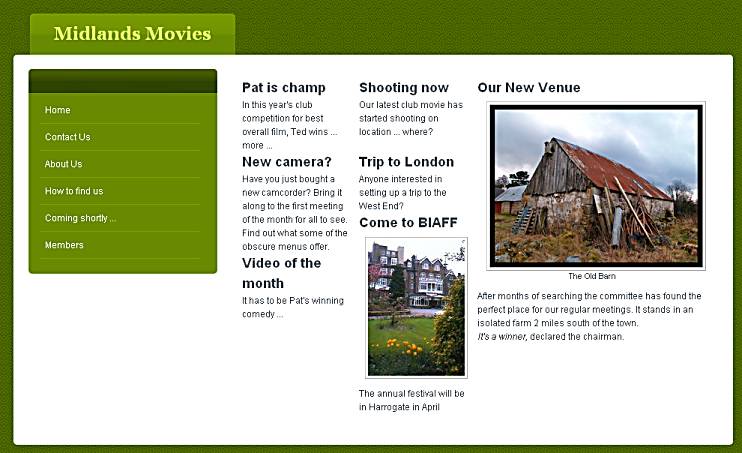
In WeeblyThis aspect of Weebly has changed since our original tutorial was written. Now it is quite easy to organise your words and pictures into columns.In the example below the theme was the menus on the left instead of at the top of the page. Then it splits the page into three columns ... |
||||
|
|
|||||
| First three Title elements
were dragged into place side by side. After the first one, the
element being dragged appears on the page as a blue line. make
sure it is on the same level as the previous one/s and drop it. Follow the titles with Text or Image elements as required, dropped on the next row side-by-side. |
By default the columns will be of
equal width. Click between the columns to display a line which can be dragged left or right as you wish to create different column widths. As you work down the page adding elements drag the new ones into line with the previous ones. |
||||
|
TThere are nine pages in this series of detailed Weebly tips: They support general articles on web design for film-making and AV club websites which begin here. [Weebly frequently update and improve their system. These pages are based on tests in March 2015.] |
|||||
Share your passions.
Share your stories.

